
To send a CAN message cyclically on a smartRAIL or smartMini device, for example as a stimulus message (CANOpen), the following two modules are required in the smartCore configuration:
{
“config”: {
“fmd”: “Canbus0”,
“messages”: [
{
“defaultMessage”: “0100”,
“messageKey”: 999,
“sendIntervalMs”: 100,
“sendMode”: “OnTimer”
}
]
},
“factory”: “fmconsumer”,
“module”: “Fmconsumer”
}
The configuration for the “canbus” module:
{
“config”: {
“bitrate”: 250000,
“fmd”: “Canbus0”,
“interface”: 0,
“listenOnly”: false
},
“factory”: “canbus”,
“module”: “Canbus0”
}
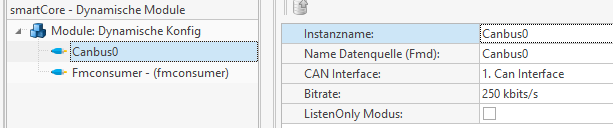
The view in the optiControl software is as follows:
- canbus
- fmconsumer
{
“config”: {
“fmd”: “Canbus0”,
“messages”: [
{
“defaultMessage”: “0100”,
“messageKey”: 999,
“sendIntervalMs”: 100,
“sendMode”: “OnTimer”
}
]
},
“factory”: “fmconsumer”,
“module”: “Fmconsumer”
}
The configuration for the “canbus” module:
{
“config”: {
“bitrate”: 250000,
“fmd”: “Canbus0”,
“interface”: 0,
“listenOnly”: false
},
“factory”: “canbus”,
“module”: “Canbus0”
}
The view in the optiControl software is as follows: